Firefox saves browser history in a sqlite database format. If you’re trying to figure out what a user browsed to or downloaded within the browser (at a high level), these are the files you want to grab. Firefox stores the history and bookmarks together in a database file named places.sqlite, which is in a user’s profile folder.
In general you would use this if you suspect a malicious file was downloaded onto a user’s machine and you’d like to figure out if came in via browsing the Internet with the Firefox browser.
Once exported or saved from a machine, you can view it using MZHistoryView. This tool will show you the URL, first visited date, last visited date, count, Title, Link or typed URL and other useful information for piecing together what occured.
Netflow logs are VERY help when you can’t do a full packet capture (or don’t need to) and just require the metadata of the traffic. The metadata consists of the source and destination IPs, the source and destination ports, and the protocols used (also know as a 5 Tuple). By using these you will be able to tell where traffic originated from, went to, and on what ports/protocols, BUT you won’t be able to dissect the details of the packet to see exactly what was sent or received.
Why is this useful? Well, to start with, just by knowing that an internal machine reached out to a known bad destination IP on port 80, could indicate that something “odd” is happening on your network. Or, for example, if you’re suddenly getting a flood of traffic from a source IP on the Internet that is hitting all of your company’s external IPs on contiguous ports could mean you’re being scanned.
I’m going to walk through a CTF problem involving netflow logs and how to read relevant information from them – such as how many records are in the log, how many times each unique source IP shows up, and how many unique source IPs are in the log. These may seem arbitrary for this problem, buyt imagine that you’re trying to figure out how many source IPs are reaching out to a malicious destination. Or even how many malicious destinations are listed in the log.
This problem involves netflow records that look like this:
First the log needs to be in a simple, commonly delimited format. For example, in the screenshot we can see that ports are separated by a colon, and there’s an arrow indicating source to destination. Those have to go. I used the following set of commands to do that then trim the whitespace to one space per column. Note: I wasn’t concerned with the time, but please know that the following will also split up time to a spaced delimeter.
cat netflow.txt| sed ‘s/->//g’ > netflownoarrow -> This removes the arrow. cat netflownoarrow| sed ‘s/:/ /g’ > netflowport -> This replaces the colon with a space. cat netflowport| sed ‘s/ */ /g’ > netflowfixed -> This trims the spaces down to one between columns.
At this point I can start using the log to get data out of it. For example an easy one is cat netflowfixed | wc -l, which will give me the total number of records in the logs.
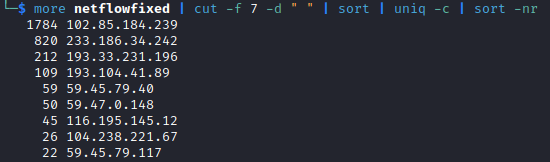
I can also use cut commands to see how frequently each source IP appears in the log: more netflowfixed | cut -f 7 -d ” ” | sort | uniq -c | sort -nr. This will cut the 7th field (the source IP), sort it, then count the instances per IP, then sort that by high to low.
I can also use this command to see how many total unique source IPs are in the log: more netflowfixed | cut -f 7 -d ” ” | sort -u | wc -l. This will cut the 7th field, sort by unique IPs, then count the number of lines.
You can adjust the commands to do the same for any of the fields as long as you change the -f 7 (7th field) to whichever other field you’d like to use.




 My Path Forward